Getting your information architecture right is the first, and arguably most important, step in building a technically sound website. This is your site’s blueprint. It’s how you organise and structure everything in a way that makes perfect sense to both search engine crawlers and your actual customers. A solid architecture directly shapes how easily Google can understand your site’s authority on a topic, which is a massive factor in securing those top rankings. This guide provides a detailed blueprint for engineering an information architecture and site navigation system that serves as a logical hierarchy for both bots and humans.
A solid architecture directly shapes how easily Google can understand your site’s authority on a topic, which is a massive factor in securing those top rankings.
Why Your Website Needs an Architectural Blueprint
Imagine trying to build a house without proper plans. You'd likely end up with a confusing maze of hallways leading nowhere and rooms that are impossible to find. It's exactly the same with a website.
Without a well-thought-out plan, you’re setting yourself up for a poor user experience, a wasted crawl budget, and, you guessed it, dismal search rankings. A strategically engineered information architecture is the very foundation of good technical SEO and user-friendly site navigation. A logical hierarchy for bots and humans isn't just a best practice; it's the core of a successful digital presence.

This blueprint is what connects your business goals to the nuts and bolts of your website's structure. It’s what gives every single page a clear purpose and an obvious path for users and search bots to follow. For Australian businesses, especially those in hyper-competitive e-commerce spaces, a logical site structure isn't just a nice-to-have—it's essential for survival.
The Core Pillars Of SEO-First Information Architecture
Before we dive into the 'how', it's crucial to understand the fundamental components that hold up a strong, SEO-driven site structure. These pillars work together to ensure your website is built for performance from the ground up, creating that essential logical hierarchy.
| Pillar | Objective for SEO | Benefit for Humans |
|---|---|---|
| Logical Hierarchy | Signals topical relevance and relationships between pages, concentrating link equity. | Makes it easy and predictable to find information by browsing. |
| Keyword-Driven Taxonomy | Aligns the site's structure with real user search behaviour and intent. | Content is organised in a familiar way that mirrors how they think and search. |
| Intuitive Navigation | Provides clear, crawlable pathways (menus, breadcrumbs) for bots to follow. | Reduces frustration and bounce rates by guiding users to their destination. |
| Technical Soundness | Ensures crawlers can efficiently discover and index content through clean URLs and controls. | A faster, more reliable experience with no broken journeys or dead ends. |
Each element addresses a critical need for both search engines and your audience. By getting these right, you create a powerful framework for organic growth.
A well-planned information architecture isn't just about shuffling pages around. It’s about building a system where content is discoverable, understandable, and valuable to both Google and your customers. It truly is the bedrock of any successful SEO strategy.
This approach transforms your website from a simple online brochure into a high-performance digital asset that actively pulls in organic traffic and drives conversions.
Laying The Groundwork with Keyword and Intent Analysis
Before you even think about wireframes or code, your site’s entire architectural blueprint rests on one thing: getting inside your audience's head. You need to know exactly what they’re searching for and, more importantly, why they’re searching for it. This isn’t just about pulling a list of high-volume keywords; it's about mapping the mental pathways of your customers directly onto your site structure.
This foundational work ensures your site navigation and content categories aren't built on internal company jargon or what you think people want. Instead, they become a direct mirror of how your customers actually search and think. Nailing this at the start saves you from excruciatingly painful and expensive structural changes later on, ensuring your architecture is ready to pull in qualified organic traffic from day one.
Beyond the Basic Keyword List
When you're doing keyword research for your site's architecture, you're not hunting for a single magic keyword for your homepage. You're building a comprehensive map of all the topics, questions, and problems your audience has. The real goal is to cast a wide net, gather every relevant search query you can find, and then start sorting them into logical groups, or "clusters."
These clusters become the core pillars of your website. For an Aussie e-commerce site selling hiking gear, the initial research might uncover a mix of terms like:
- Broad buckets: "hiking boots," "backpacks," "tents"
- Specific products: "men's waterproof hiking boots," "lightweight 2-person tent"
- Questions: "how to choose hiking boots," "what to pack for a day hike"
- Comparisons: "brand A vs brand B hiking shoes," "best hiking packs Australia"
This raw data is the clay you'll use to sculpt your site’s taxonomy.
Decoding User Search Intent
With your raw keyword data in hand, the next, absolutely critical step is to figure out the user's intent. Search intent is the ‘why’ behind every single query. If you can understand that, you can build pages that give searchers exactly what they want—a massive tick in the box for Google.
Generally, intent falls into four main camps:
- Informational: The user just wants an answer. Think, "how to waterproof a tent." These queries are perfect fuel for your blog posts, how-to guides, and resource articles.
- Navigational: They're looking for a specific site or brand. For example, a search for "Anitech blog."
- Commercial Investigation: They're in research mode, weighing up their options before they buy. A classic example is "best hiking boots for wide feet." This is where your category pages, buying guides, and comparison articles shine.
- Transactional: They’ve got their wallet out and are ready to click ‘buy’. Queries like "buy men's hiking boots size 11" are pure gold. These are your money pages—your top-level categories and specific product pages.
Once you start mapping keywords to intent, a natural site structure almost magically begins to appear. Transactional and commercial terms tend to form your core product and service categories, while all the informational queries branch off to support them through a blog or a resource centre.
From Keywords to a Logical Hierarchy
Now the fun part begins. With your keywords clustered and their intent classified, you can finally start sketching out the skeleton of your website's hierarchy. This is where you translate all that messy search data into a clean, logical, and scalable structure that will become your main navigation. This process is fundamental to building a logical hierarchy for bots and humans.
Let's go back to that hiking gear shop. Their keyword clusters would naturally fall into top-level categories like these:
- /footwear/
- /packs/
- /tents/
- /clothing/
Drilling down into /footwear/, further keyword analysis would point you towards logical subcategories like /mens/, /womens/, and /kids/. And if you go one level deeper under /mens/, you’d likely find even more specific sub-categories like /hiking-boots/ and /trail-running-shoes/.
This data-driven approach means every single category and subcategory on your site actually corresponds to how people search. You end up with a site navigation system that feels completely intuitive to users because it speaks their language and follows their logic. The result? A structure that's inherently optimised for search engines because it's built on a rock-solid foundation of user behaviour—a crucial piece of your entire technical SEO blueprint.
Designing Logical URL Structures And Content Silos
Once you’ve mapped out your keywords and sketched the hierarchy of your site, it’s time to bring that logic to life in your URLs. A clean, descriptive URL is so much more than a web address—it's a critical signpost for users and search engines alike. It gives everyone an immediate clue about the page's content, which is a massive boost for usability and a core part of your technical SEO foundation.
Think of your URL structure as the digital breadcrumb trail for your website. A good one should perfectly mirror the logical paths you defined during your keyword research. A user should be able to glance at a URL and have a pretty good idea of what the page is about and where it sits in the grand scheme of your site. This clarity is paramount for creating a logical hierarchy that bots and humans can easily follow.
Crafting SEO-Friendly URLs
The best URLs are short, sharp, and descriptive without being stuffed with keywords. You want to ditch all the unnecessary parameters, random numbers, and technical jargon, leaving a clean path that both people and search crawlers can easily follow.
Here’s what I always tell clients when we're engineering their URLs:
- Make them readable for humans. Nobody knows what
/p-1294-b/means. On the other hand,/mens-hiking-boots/is crystal clear. Always use real words that describe the page. - Use hyphens to separate words. This is the gold standard. Google understands it, people understand it. Just avoid underscores (
_) or spaces (%20) like the plague. - Pop your target keyword in there. Weave the page's primary keyword into the URL slug naturally. It’s a direct signal to Google that helps them understand what the page is about right from the get-go.
- Follow a logical folder structure. The URL path should reflect your site’s hierarchy. Something like
anitech.au/footwear/mens/hiking-bootsinstantly communicates the relationship between those categories.
Nailing these basics creates a URL structure that’s inherently optimised. That clarity helps search engines grasp the thematic relevance of your content, which is a huge part of building up that all-important topical authority.
The Power Of Content Siloing
Beyond clean URLs, one of the most effective architectural plays you can make is content siloing. In simple terms, this means grouping your site's content into distinct, thematically-related sections. Instead of just having a flat jumble of pages, you organise them into virtual "silos" based on their subject matter. This is a core strategy for building a logical hierarchy that benefits both search bots and human visitors.
The end goal is to create a focused hub of expertise on a specific topic. When you structure your content this way and link it all together intelligently, you're sending a powerful message to search engines: you are the comprehensive resource on this subject. This concentration of relevance is an absolute game-changer, especially in competitive markets.
This diagram shows how data silos can isolate information, which is a concept we borrow for SEO to create focused topical authority.
For a website, we intentionally break down these silos with strategic internal links. This lets us show deep expertise in one area while also allowing link equity to flow logically to other related topics.
A content silo isn't just a folder; it's a strategic decision to build deep, interconnected expertise around a core topic. This structure tells Google, "We don't just have one page on this topic; we have an entire library."
For instance, a digital marketing agency like Anitech could build silos for "SEO," "PPC," and "Content Marketing." Inside the "SEO" silo, they'd have pages covering everything from keyword research and link building to technical audits. Critically, all these pages would link heavily to each other, creating a dense, interwoven cluster of content that reinforces the silo's theme.
This approach ticks two massive SEO boxes:
- It Concentrates Link Equity. By linking mostly to other pages within the same silo, you keep the flow of PageRank contained within that topic. This helps the main "pillar" page of the silo gather more authority, giving it a much better shot at ranking.
- It Demonstrates Topical Authority. It sends an unmistakably clear signal to Google that your site has extensive, well-organised information on a subject. This is far more powerful than having a bunch of scattered, unrelated articles floating around.
At the end of the day, logical URLs and smart content silos are the bedrock of any solid information architecture blueprint. They transform your site from a random collection of pages into a highly organised, authoritative resource that both users and search engines can actually understand and trust.
Weaving Your Navigation into the User Journey
Think of your website's navigation as the central nervous system of your entire information architecture. It's the roadmap for users and search engine crawlers alike, guiding them to your most important content. This is where your carefully laid plans hit the real world, and a well-thought-out navigation system is what separates a confusing site from an intuitive one. It's the public-facing expression of the logical hierarchy you've built for your bots and human users.
A great navigation system isn't just about SEO or just about user experience—it's about finding the sweet spot where both thrive. It needs to create clear, simple pathways through your main menu, breadcrumbs, and even your footer links. The goal is to make sure your most valuable pages are never more than a few clicks away. Get this right, and you'll keep users engaged while clearly signalling your site's structure to Google.
Going Beyond the Main Menu with Internal Links
The main navigation is just the beginning. The real magic happens with a smart internal linking strategy. This is all about placing contextual links within your content—think blog posts, detailed guides, and service pages—to create a powerful, interconnected web of relevance. Every link you place is like a vote of confidence, passing authority and context from one page to another.
When done right, a solid internal linking plan achieves several crucial goals at once:
- Spreads Authority: Links from your high-authority pages (like a viral blog post) to your key commercial pages (like a product category) pass on valuable "link equity," giving them a much-needed boost in the rankings.
- Guides the User: Contextual links can seamlessly lead a user from an informational article they just read to a relevant product or service, naturally moving them closer to making a purchase.
- Boosts Crawlability: These links create new pathways for Googlebot to discover pages that might otherwise be buried deep within your site, ensuring more of your content gets indexed properly.
I always tell my clients to think of internal linking like building local roads. Your main navigation forms the major highways, but it's the smaller, interconnected roads that ensure no part of your site is left isolated. This lets SEO value and user traffic flow freely between all your related content.
The diagram below shows the concept of content siloing, which is the foundation of any good internal linking strategy.
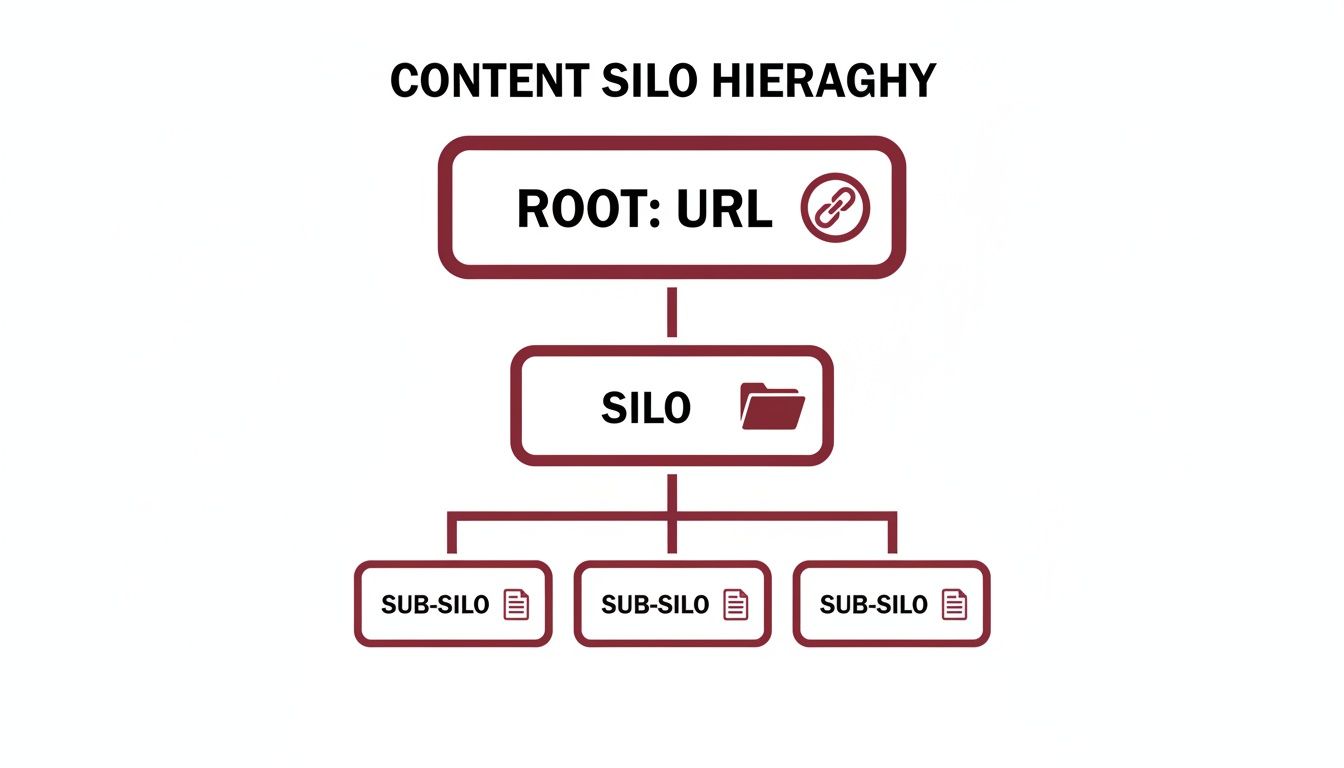
This kind of hierarchy demonstrates how a broad topic (the silo) can be supported by more specific sub-topics, all linking back and forth to build immense topical authority.
Taming Faceted Navigation for Ecommerce
For Australian ecommerce sites, one of the trickiest parts of navigation is handling faceted navigation. These are the filters users love—letting them sort products by size, colour, brand, or price. While fantastic for users, they can quickly turn into a technical SEO disaster if you're not careful. This is a critical area where the logical hierarchy for humans (filtering) can conflict with the needs of search bots if not managed correctly.
Every time a user clicks a filter, a new URL is often generated with parameters (e.g., ?colour=red&size=large). Without the right controls in place, search engines can suddenly see thousands of near-identical pages. This leads to massive duplicate content issues and a completely wasted crawl budget. Googlebot ends up spending its precious time crawling endless filter combinations instead of finding your new product pages or latest blog posts.
To get this under control, you need to use a few technical tools to tell search engines which pages to focus on and which to ignore.
- Canonical Tags: Your first line of defence is the
rel="canonical"tag. You should apply this to all filtered URLs, making sure they point back to the main, unfiltered category page. This essentially tells Google, "All these filtered views are just variations of this one core page, so please consolidate all ranking power there." - Robots.txt Disallow: For certain parameters that provide zero SEO value, you can use your
robots.txtfile to block crawlers from even accessing those URLs. This needs to be handled with care, though, as blocking pages can prevent link equity from flowing through them. - Noindex Meta Tag: Another option is to let Google crawl the pages but stop them from being indexed by adding a
noindextag. This allows Google to follow any links on the page but keeps the thin, filtered URL out of its search results.
In my experience, the best solution is usually a smart combination of these methods, tailored to your site's specific setup. For example, you might want Google to index a URL for a popular filter like /shoes/?brand=nike, as people actually search for that. But for more complex, multi-filter URLs, you’d use a canonical tag. Getting this balance right is an absolute non-negotiable for any online store's site navigation strategy.
Weaving in the Critical Technical SEO Threads
A brilliant information architecture on paper is useless if search engines can't actually make sense of it. This is where the technical nuts and bolts come in. Your perfectly planned site structure, content silos, and navigation need a solid technical bedrock to perform. Think of this as the bridge between your blueprint and a live, high-performing website that Google can efficiently crawl, understand, and ultimately, rank.
This is the point where we move from the conceptual to the concrete. It’s all about managing your crawl budget, giving clear instructions to search bots, and using structured data to add a rich layer of context that helps your content stand out. If you skip these steps, even the most elegant architecture will fall flat.
Making the Most of Your Crawl Budget
Every site gets an allowance from Google—a "crawl budget"—which is the amount of time and resources Googlebot will dedicate to exploring your pages. For big ecommerce sites with thousands of URLs, this is absolutely crucial. You don't want Googlebot wasting its time on low-value pages with weird URL parameters when it could be discovering your brand-new product line.
A well-designed information architecture gives you a head start, but you still need to be proactive.
- Be a good traffic controller with robots.txt: This file is your first handshake with a search crawler. Use it to put up "do not enter" signs for areas like admin logins, internal search results, and checkout funnels. This steers crawlers straight to the content you actually want indexed.
- Tame your URL parameters: As we covered with faceted navigation, parameters can spawn a near-infinite number of URLs. Get into Google Search Console and use canonical tags to tell Google which parameters matter and which ones to ignore.
- Keep your house clean: Regularly hunt down and fix broken links (404 errors) and set up permanent 301 redirects for any pages you delete. Every broken link is a dead end for a crawler, and that's a small piece of your budget wasted.
For a much deeper dive into finding and fixing these kinds of technical gremlins, check out our guide on the master framework for technical SEO audits in 2025. It walks you through a full-site health check.
Clearly Communicating Your Site's Structure
It’s not enough to just let crawlers find your pages; you need to hand them a map and a legend. This is exactly what XML sitemaps and schema markup do. These tools are vital for communicating your logical hierarchy directly to search engines, ensuring bots understand your site as well as your human users do.
An XML sitemap is simply a list of all the important URLs you want search engines to know about. It’s a direct roadmap, helping them discover pages that might otherwise be buried deep within your site's structure. For larger sites, it's smart to break these up—maybe one for products, one for categories, one for blog posts—and then link to them all from a central sitemap index file.
Schema markup (or structured data) takes this a step further. It's a special vocabulary of code you add to your pages to give search engines a much richer understanding of your content.
Think of schema markup as adding descriptive labels to everything on your page. Instead of Google just seeing a string of text like "$49.95," schema tells it, "This number is the price, the currency is AUD, and the product is currently in stock." That kind of clarity is what powers those eye-catching rich snippets in the search results.
Handling International Signals with Hreflang
For any Australian business selling overseas or catering to different language groups, getting hreflang tags right is non-negotiable. These little snippets of HTML tell Google which version of a page to show to a user based on their language and location.
If you run separate sites for Australia (en-au) and New Zealand (en-nz), hreflang tags stop Google from thinking they're just duplicate content. They make sure Aussies land on the Australian site with local pricing and shipping, while Kiwis get directed to theirs. A stuff-up here can mean ranking the wrong site in the wrong country, leading to frustrated customers and lost sales.
At the end of the day, these technical fundamentals are what breathe life into your information architecture. Core elements like site speed and mobile-friendliness are more important than ever in Australia's fierce online market. According to 2025 data, Google’s focus on Core Web Vitals means Australian websites need to load in under 2.5 seconds to stay in the game. This has a direct impact on user experience and rankings, with ecommerce sites that load in 2 seconds or less seeing bounce rates around 9%, a figure their slower competitors can only dream of. For more on these local benchmarks, it's worth checking out the insights from Netstripes.
Implementing A Mobile-First Navigational Architecture
Let's be blunt: if you’re still thinking about your website's design for a desktop first, you're already behind. The vast majority of web traffic is now on smartphones, which is exactly why Google’s mobile-first indexing is a thing. What Google sees on your mobile site is what it uses to rank you. Period.
This reality completely flips the traditional design process on its head. We no longer design a beautiful, sprawling desktop experience and then figure out how to cram it onto a small screen. Instead, we must engineer the experience for a mobile device from the ground up and then thoughtfully expand it for larger displays.
This mobile-first mindset has massive implications for your site navigation. Your most important pages, key calls-to-action, and critical user journeys need to be front and centre on a mobile screen. It often means trading complex, layered desktop menus for something far more streamlined and intuitive.

Prioritising The Mobile User Experience
Building for mobile is an exercise in ruthless prioritisation. You simply don't have the screen real estate for clutter. Overloaded layouts and links that are impossible to tap with a thumb create a frustrating experience, sending users (and your engagement metrics) running.
Here’s what I focus on when engineering a mobile navigation:
- Touch-Friendly Design: All buttons and links need to be big enough for a finger tap. Make sure there’s enough breathing room around them to prevent frustrating mis-clicks.
- 'Hamburger' Menus: Love them or hate them, the hamburger icon is a universally understood way to keep navigation tidy and out of sight until it's needed.
- Visible CTAs: Your main call-to-action—whether it's "Buy Now" or "Get a Quote"—needs to be immediately visible above the fold. Don't make people hunt for it.
- Performance First: Mobile users have zero patience for slow-loading pages. Optimise every image, script, and element for lightning-fast speed.
A seamless mobile experience isn't a 'nice-to-have' feature anymore; it's a fundamental requirement for technical SEO. If your mobile site is a pain for users, you can bet it's also a pain for Google's crawlers, which will directly hit your rankings.
This is especially true here in Australia, where mobile search is king. That first organic result on mobile pulls in an average click-through rate of 31.7%. And for Aussie ecommerce sites, organic search is a powerhouse, driving a staggering 53.3% of all traffic. You can dig into more local data by checking out the state of Australian SEO in 2025. Getting your mobile experience right isn't just about good design; it's about capturing real revenue.
Got Questions About Site Architecture? We've Got Answers.
Here are a few of the most common questions we get from clients about building a solid information architecture. These quick answers cut through the jargon and give you the practical insights you need.
How Much Does Site Structure Really Affect SEO?
Think of your site structure as the blueprint you hand to Google. A well-organised, logical hierarchy is one of the most powerful signals you can send. It helps search engines quickly discover all your content, figure out how different pages relate to each other, and ultimately recognise you as an authority on a particular topic.
It's also about how link equity, or "link juice," flows through your site. A clean structure is a core part of technical SEO engineering because it channels authority from strong pages (like your homepage) to your most important service or product pages, giving them the boost they need to rank.
What Does an Ideal URL Structure Look Like?
Simple is always better. The best URLs are clean, descriptive, and directly reflect your site's hierarchy. They should be easy for a person to read at a glance and ideally include the main keyword for that page, but without stuffing it in unnaturally.
For instance, yourdomain.com.au/services/seo/technical-audits is a world away from a messy, system-generated URL like yourdomain.com.au/page?id=123. This kind of logical folder structure reinforces your content silos and makes your site navigation clearer for everyone—users and search bots included.
How Deep Is Too Deep for a Page to Be?
You've probably heard of the "three-click rule"—the idea that your most important pages should be accessible within three clicks from the homepage. It’s a great guideline for keeping your information architecture blueprint relatively flat and user-friendly.
While it's not a hard-and-fast rule that Google will penalise you for, it’s a solid principle. Keeping key pages close to the surface makes them easier for search engine crawlers to find and index. More importantly, it stops users from getting frustrated and giving up before they find what they're looking for.
Can I Just Change My Site Architecture Later On?
You can, but it's a bit like performing surgery on a moving train. It's a high-stakes process that needs to be managed with incredible care. Changing your site's fundamental structure, especially your URLs and navigation, demands a flawless 301 redirect plan to pass on your hard-earned link equity and prevent a storm of broken links (404 errors).
Making big architectural changes almost always leads to some temporary ranking fluctuations while Google re-crawls and re-assesses everything. It's far, far better to invest the time upfront to get the planning right and build an architecture that can grow with you from day one.
Ready to build a high-performing site architecture that drives measurable growth? The expert team at Anitech specialises in data-driven SEO strategies tailored for the Australian market. Book your free consultation with Anitech today!