Quick Summary: JavaScript SEO Mastery is about ensuring search engines can see and index your dynamic content. This guide covers diagnosing rendering issues with tools like Google Search Console, choosing the right strategy (SSR, SSG), and implementing best practices for crawlability and performance to solve rendering risks and achieve full indexation.
Mastering JavaScript SEO is fundamentally about one critical goal: making sure search engines like Google can actually see, render, and index all the brilliant, dynamic content on your website. If your JavaScript isn't handled with precision, entire sections of your site can become completely invisible to crawlers. This is a quiet killer for your technical SEO, leading to poor indexation, falling rankings, and ultimately, lost revenue from undiscovered content.
Why JavaScript Can Silently Sabotage Your SEO
Let's get straight to the core issue. Modern websites lean heavily on JavaScript to deliver the slick, interactive, and dynamic experiences users love. But this very dependency can create a massive blind spot for your SEO efforts. The fundamental problem is a potential disconnect: what your customers see in their browser isn't always what a search engine crawler sees on its first pass. This gap is where even the most well-crafted SEO strategies can unravel, as critical content fails to be indexed.

Google uses a two-wave indexing process. The first wave is a quick crawl of the basic HTML source code. The second wave, which could happen seconds, days, or even weeks later, is when Google returns to render the JavaScript and see the final, fully-formed page. If your site’s JavaScript is too complex, contains errors, or is slow to execute, that second rendering wave can fail or time out. The result? Your most important content is left unrendered and, consequently, unindexed.
Common JavaScript SEO Problems and Their Business Impact
For many businesses, these technical glitches aren't just lines of code on a screen—they translate into very real commercial problems. To make this clear, here’s a breakdown of common issues and what they actually mean for your bottom line, a crucial aspect of technical SEO.
| JavaScript SEO Issue | Technical Symptom | Business Impact Example |
|---|---|---|
| Client-Side Rendering (CSR) without a fallback | Googlebot sees a blank page or just a loading spinner on the initial crawl. | An e-commerce site misses out on sales because product descriptions and prices aren't indexed. |
| Slow or blocked API calls | Key content (e.g., product lists, reviews) fails to load before Googlebot's rendering timeout. | A tourism operator loses bookings because their tour availability widget isn't visible to Google. |
| Content hidden behind user interaction (e.g., clicks) | Important text, like in an accordion or "read more" tab, isn't in the initial HTML. | A law firm's detailed service descriptions are never indexed, failing to rank for specific legal queries. |
| No internal links in the initial HTML | Navigation menus and other internal links are generated by JavaScript, preventing discovery. | Googlebot struggles to discover and crawl deeper pages, leading to poor indexation coverage for the entire site. |
These are not theoretical problems; they are common challenges that affect businesses daily. The key to JavaScript SEO mastery is to connect the technical symptom to the business outcome to understand the true cost of ignoring JavaScript rendering risks.
Spotting the Warning Signs
The good news is that these rendering issues leave clues. Data from technical SEO audits consistently shows that JavaScript rendering challenges are a major hurdle, affecting a significant portion of modern websites. For retailers, these problems can translate directly into lost potential sales from dynamic content that search engines simply never see.
What's more, without proper JavaScript handling, Googlebot often misses dynamic content like FAQ schema or LocalBusiness structured data. This means sites are missing out on rich snippets that could boost click-through rates significantly.
Key Takeaway: You cannot assume search engines see your site the way users do. Unoptimised JavaScript creates a gap between your content and the crawler. Bridging that gap is the essence of mastering technical JavaScript SEO.
Poorly handled JavaScript also hammers your site's performance metrics, highlighting the critical link between SEO and website speed. If your PageSpeed Insights report is a sea of red, or if you check Google's cached version of your page and find it half-empty, you've almost certainly got a JavaScript rendering problem. This isn't just a technical box-ticking exercise; it's fundamental to your online survival and growth.
Your Toolkit for Diagnosing Rendering Issues
You can't fix a problem you can't see. The first real step in JavaScript SEO mastery is to put on your detective hat and start hunting for the rendering faults that are hiding your content from Google. This isn't about guesswork; it's about using the right tools to get a clear picture of what Googlebot actually finds when it visits your site.
Start with Google's Point of View
Your investigation should always start with the most direct source of truth: Google Search Console (GSC). Think of it as your window into Google’s world.
When you use the URL Inspection Tool, you are essentially asking Google to show you its homework. You get to see the exact rendered HTML that Googlebot captured during its last visit. This is the quickest way to spot any major differences between what your users see in their browser and what the crawler actually managed to index.
Peek Behind the Curtain with Chrome DevTools
While GSC shows you the final result, Chrome DevTools lets you simulate the rendering process in real-time. It’s an absolutely essential tool for getting to the bottom of JavaScript issues.
One of the simplest yet most revealing checks is to disable JavaScript and see what breaks.
Here’s how you do it:
- Open your webpage in Google Chrome.
- Right-click anywhere and choose "Inspect" to open DevTools.
- Press
Control+Shift+P(Windows) orCommand+Shift+P(Mac) to bring up the Command Menu. - Type "JavaScript" and select "Disable JavaScript".
- Now, refresh the page.
What you're left with is the raw HTML—the very first thing a crawler sees before a single script runs. If your product descriptions, key navigation links, or calls-to-action have suddenly vanished, you've just found a critical rendering dependency. This simple test immediately exposes any content that's invisible during that crucial first wave of indexing.
Google’s own documentation includes a diagram that perfectly illustrates this two-step rendering process. It shows just how different the initial HTML can be from the final page.
This highlights a key vulnerability: Google first crawls the basic HTML, and only later comes back to render the JavaScript. That second step is where delays and failures can happen, leaving your dynamic content in limbo.
Hunt Down the Render-Blocking Culprits
Disabling JavaScript is a great start, but the Performance tab in DevTools is where you can pinpoint the specific scripts causing slowdowns.
Running a performance profile generates a detailed timeline of your page load. Look for the "flame graph"—it's a visual map of script execution. Those long, solid blocks of colour are your culprits. They represent scripts that are hogging the main thread, stopping anything else from rendering.
By digging into this timeline, you can spot scripts that aren't essential for the initial view, like social media widgets or third-party analytics trackers, and figure out how to defer them. This one tweak can massively improve your Largest Contentful Paint (LCP) and make a real difference to user experience.
The real power comes from connecting the dots between tools. Take what you've learned in DevTools and cross-reference it with your PageSpeed Insights report. You'll often find that the render-blocking resources flagged by PageSpeed Insights are the very same long tasks you identified in the Performance tab.
Similarly, running your page through the Mobile-Friendly Test can surface other issues. Since it renders the page on a mobile viewport, it might uncover layout shifts or content that gets hidden on smaller screens—problems often caused by JavaScript.
By looking at these reports through a JavaScript SEO lens, you start asking the right questions: "Is my most important content rendering quickly and correctly for mobile crawlers?" This methodical approach takes you from just spotting problems to truly understanding their root cause, which is the foundation of any effective technical optimisation.
Choosing the Right Rendering Strategy for Your Business
Figuring out the best way to render your JavaScript site can feel a bit like choosing a vehicle for a cross-country road trip. There's no single "best" option—the right choice hinges on your destination, budget, and required flexibility. For any business, getting this part of your technical SEO right is about selecting the most efficient and effective rendering strategy to achieve your goals and ensure full indexation.
There's no one-size-fits-all solution here. The three main contenders—Server-Side Rendering (SSR), Static Site Generation (SSG), and Dynamic Rendering—each have their own set of pros and cons. The path you choose will directly impact your site's performance, how easily Google can crawl your content, and, ultimately, your bottom line.
Server-Side Rendering (SSR): The E-Commerce Powerhouse
Server-Side Rendering is a robust approach where the server does the heavy lifting, generating the full HTML for a page before sending it to the browser. When Googlebot or a user lands on a page, they get a complete, ready-to-view document straight away.
This makes SSR a fantastic choice for sites with dynamic content that changes often and needs to get indexed quickly.
- Real-World Scenario: Picture a large e-commerce store with thousands of products. Stock levels, prices, and promotions are constantly in flux. With SSR, every time a product page is requested, the server builds it with the absolute latest information. This ensures both users and search engines see up-to-the-minute content, which is crucial for ranking in competitive retail searches.
Static Site Generation (SSG): The Content Site Champion
Static Site Generation takes a completely different approach. It pre-builds every single page as a static HTML file during the development process, before the site even goes live. These lightweight files are then served directly to users and crawlers, making for an incredibly fast and secure experience.
SSG is the perfect fit for websites where the content is fairly stable.
- Real-World Scenario: Consider a local service business website. The core content—services, contact info, testimonials—doesn't change much. Using SSG means the site is lightning-fast, cheap to host, and highly secure. There's no complex server-side logic needed, making it a brilliant, low-maintenance solution for a business focused on generating leads.
This flowchart can help you start mapping out which path might be right for your own site when you start investigating rendering risks.
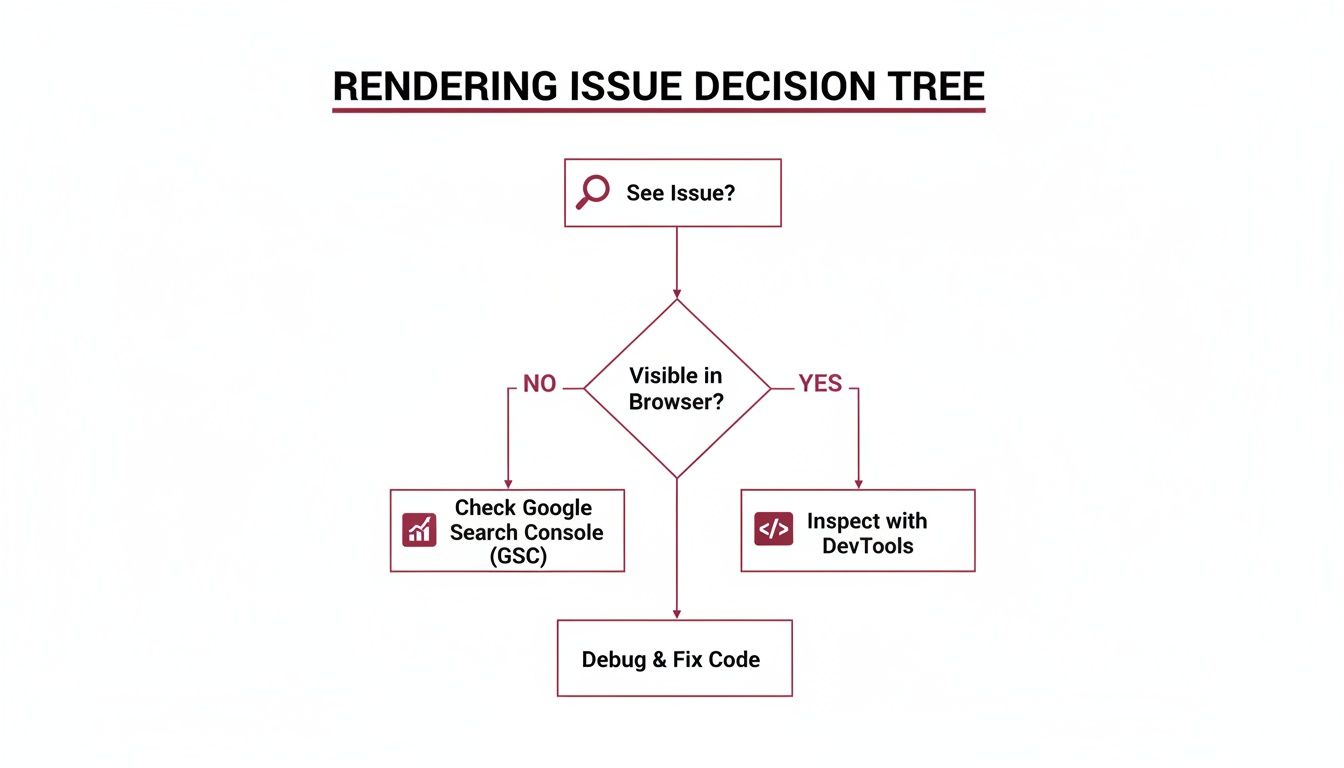
As the diagram shows, where you first spot the problem will point you towards the right tool for the job.
A Quick Look at Dynamic Rendering and Hydration
Dynamic Rendering is a hybrid approach. It detects who is making the request. If it’s a search engine bot, it serves a fully rendered, static HTML version. If it’s a human user, it delivers the standard client-side JavaScript experience. While Google once suggested this as a workaround, it’s now generally seen as a stop-gap measure rather than a long-term strategy for modern web development.
A critical concept you'll hear about with modern frameworks is hydration. After the server sends the initial HTML (via SSR or SSG), the browser downloads the JavaScript and "hydrates" the static page, attaching all the event listeners to make it interactive. If this process is clunky, it can block the main thread, leaving users with a page that looks ready but doesn't respond to clicks. This can be a real killer for your Core Web Vitals, especially Interaction to Next Paint (INP).
To help you weigh these options, here's a quick comparison of the main strategies.
Comparison of JavaScript Rendering Strategies
| Strategy | Best For | SEO Benefit | Implementation Complexity |
|---|---|---|---|
| Server-Side Rendering (SSR) | Dynamic, data-heavy sites (e-commerce, news) | Fast initial load & full indexability of fresh content. | Moderate to High |
| Static Site Generation (SSG) | Content-driven sites with infrequent updates (blogs, portfolios, SMB sites) | Blazing-fast performance, high security, and excellent crawlability. | Low to Moderate |
| Dynamic Rendering | As a temporary fix for sites struggling with client-side rendering issues. | Ensures bots get fully rendered content without major architectural changes. | High |
Ultimately, the best strategy depends on balancing your site's specific needs with your development resources. Each one offers a different trade-off between performance, complexity, and SEO efficiency.
The consequences of getting this wrong are severe. Industry data projects that websites with poor JavaScript SEO could see conversion rates from organic traffic drop significantly. For mobile users, who make up a majority of searches, unoptimised JavaScript can cause interaction delays that lead to bounce rates spiking. You can read more about the future of SEO planning and its impact on performance from Temerity Digital.
Picking a rendering strategy isn't just a technical decision; it's a business one. It means you have to weigh development costs, user experience, and the absolute necessity of being visible in search engines. By looking at these options through the lens of real-world use cases, you can make a smart choice that sets you up for long-term technical SEO success.
Alright, you've chosen a rendering strategy. But a great plan is useless without flawless execution. This is where the real work begins, moving from theory to the practical steps that get your dynamic content crawled, rendered, and properly indexed by Google.
The name of the game is making life as easy as possible for search engine bots. We need to create a frictionless path so they can see and understand every valuable piece of content on your site.

Protect Your Crawl Budget Like It's Gold
Googlebot doesn’t have unlimited time and resources; it operates on a strict crawl budget. Every second it spends downloading and running scripts that don't produce content is a second wasted. Protecting this budget is priority number one for effective JavaScript SEO.
Your best friend here is code-splitting. Instead of forcing Googlebot (and users) to download one giant JavaScript file for your entire website, break it up. Serve smaller, route-based chunks. Someone landing on your homepage only gets the JavaScript needed for that page, not the code for your checkout or contact form.
Next, you must stop search crawlers from running scripts they simply don't need. I’m talking about live chat widgets, third-party ad network scripts, or social sharing buttons. They’re great for users, but they’re just dead weight to Googlebot, slowing down rendering for no SEO benefit. A simple user-agent detection on the server can stop these scripts from ever being sent to Googlebot.
Don't Sabotage Your SPA with Broken Internal Links
I’ve seen this mistake countless times on Single-Page Applications (SPAs), and it's a killer. Developers often use onClick events on a <div> or <span> to handle navigation. It looks and feels like a link to a human, but to a web crawler, it’s a complete dead end.
Crucial Best Practice: Every single internal link must be a standard
<a href="/your-page-url">tag. Search engines are built to followhrefattributes. This is non-negotiable for JavaScript SEO mastery.
Get this right, and even if rendering hits a snag, Google can still map out your site's structure from the raw HTML.
Tame JavaScript to Nail Your Core Web Vitals
Performance isn't just a "nice-to-have" for user experience; it's a massive part of modern technical SEO. And more often than not, JavaScript is the prime suspect when Core Web Vitals scores are poor.
Here's a quick-fire checklist to get your performance in check:
- Defer Non-Critical JavaScript: If a script isn't essential for rendering the content a user sees immediately, push it back. Use the
deferorasyncattributes so the browser can get the important visual content painted first. - Lazy-Load Everything Below the Fold: Images, videos, and iframes that aren't in the initial viewport should be lazy-loaded. This is a huge win for your Largest Contentful Paint (LCP).
- Stamp Out Hydration Errors: Hydration is the process of JavaScript "waking up" a static page to make it interactive. If the server-rendered HTML doesn't perfectly match what the client-side JavaScript expects, the browser has to re-render everything. This can crush your Interaction to Next Paint (INP) score and make the page feel sluggish.
For an e-commerce site, this could be as simple as:

Getting these fundamentals right has a direct impact on how fast and reliable your site feels to both users and search engines. With mobile devices driving a majority of traffic, it's a critical differentiator. We’ve seen firsthand how implementing server-side rendering for service providers and startups has boosted organic traffic significantly.
You can dig deeper into these trends on the Safari Digital blog. These aren't just abstract concepts; they're the practical steps that ensure your dynamic content gets the visibility and performance it needs to dominate the search results.
Keeping Your JavaScript SEO in Check: Monitoring and Validation
Getting your rendering strategy live is a massive win, but the work doesn't stop there. Technical SEO, especially when JavaScript is involved, is never a "set and forget" deal. Real JavaScript SEO mastery comes from building a continuous feedback loop. You need to be constantly monitoring and testing to make sure your fixes are holding up and haven't been undone by the latest code push. This is how you turn a one-off project into a lasting advantage.
Think of it like this: you wouldn't get a high-performance car tuned once and then drive it for years without ever checking the oil. It’s the same idea here. Regular health checks keep your site in peak condition for search engines.
The Unfiltered Truth: Server Log File Analysis
Tools like Google Search Console show you Google's interpretation of what happened. Your server logs? They show you the raw, unfiltered truth. Every single request made to your server is recorded, including every visit from Googlebot. For an SEO, this data is an absolute goldmine for understanding precisely how crawlers behave.
Diving into your logs helps you answer questions that no other tool can:
- Are your JS files being crawled properly? You can compare the crawl frequency of your essential JavaScript files against your core HTML pages. If there's a big gap, it might mean Googlebot is de-prioritising your scripts, which will delay rendering.
- Is your crawl budget being wasted? Are crawlers burning through requests on non-essential scripts like third-party tracking pixels or social media widgets? This eats up your crawl budget, leaving less room for Google to find and index your actual content.
- Are resources loading reliably? You can check the server response codes for your critical JS and CSS files. If they’re frequently returning 4xx or 5xx errors, it can bring the whole rendering process to a screeching halt.
This kind of analysis tells you if your rendering solution is actually efficient or if you've just swapped one bottleneck for another.
A New Look at Google Search Console
Once your rendering fixes are in place, Google Search Console becomes less of a diagnostic tool and more of a validation dashboard. You’re not just hunting for problems anymore; you're confirming your solutions are working and spotting new issues before they can grow.
Keep a close eye on these specific reports:
- Core Web Vitals: You should see a real improvement here after optimising your JavaScript. Pay special attention to your INP (Interaction to Next Paint) score. Even with a fast initial load, a clunky hydration process can still make the page feel sluggish to users.
- Crawl Stats: This gives you a high-level view of Googlebot’s activity. You're looking for a healthy, consistent trend in "Total crawl requests" and want to see the "Average response time" stay low. A sudden spike here could be the first sign of a new performance problem.
- Index Coverage Report: This is where you see the proof. The number of pages flagged as "Crawled – currently not indexed" should drop, while "Submitted and indexed" pages should rise, particularly for those dynamic parts of your site that were previously invisible to Google.
My Tip: Don't just glance at the top-line numbers. Use the filters in GSC to drill down into specific sections of your site, like your blog or key product categories. This ensures everything is performing well, not just the homepage.
Scaling Up Your QA with Automated Testing
For bigger, more complex websites, checking every page manually just isn't feasible. This is where you bring in the big guns: automated testing. A headless browser library like Puppeteer (built by Google's Chrome team) is perfect for this. It lets you write scripts that act just like a crawler, rendering your pages automatically.
You can set up scripts that will:
- Load your most important pages on a set schedule, say, every morning.
- Snap a screenshot of the rendered content "above the fold."
- Extract the final rendered HTML and check that critical text and links are actually present.
- Fire off an alert to your team if the screenshot is blank or key content is missing.
This kind of automation is your early warning system. It catches rendering failures from new code deployments before they have time to affect your search rankings. By building this kind of monitoring framework, you create a resilient system that not only fixes today's JavaScript SEO issues but also defends against tomorrow's. It's how you prove the real, tangible ROI of your work with cold, hard data.
JavaScript SEO: Your Questions Answered
When you dive into the world of JavaScript SEO, a few common questions always seem to pop up. It's easy to get stuck on the technical details, but getting these fundamentals right is what separates a site that ranks from one that's invisible to Google. Let's tackle some of the most frequent queries.
How Can I Spot a JavaScript SEO Problem on My Site?
The first and most direct way is to jump into your Google Search Console account. Grab a URL, plug it into the URL Inspection Tool, and run a live test. Pay close attention to the screenshot and the rendered HTML under 'View Crawled Page'. Does it look the same as what you see in your browser? If key content, product links, or images are missing, that's a classic sign Google is struggling to render your page correctly.
Another quick test is to find a unique snippet of text from a dynamic part of your site—maybe a product description hidden in a tab or a user-generated review. Copy it, paste it into Google Search, and wrap it in quotation marks. If your page doesn't show up at all, Google isn't seeing that content, which means it can't index it.
Finally, consistently poor Core Web Vitals scores are a huge red flag. If your LCP and INP metrics are in the red, there's a very good chance that unoptimised JavaScript is the culprit.
Is Server-Side Rendering the Only Answer?
Not at all. While Server-Side Rendering (SSR) is incredibly powerful—it sends a fully formed HTML page to both users and crawlers—it's not a one-size-fits-all solution. For a large e-commerce site with thousands of products and constantly changing stock levels, it's often the gold standard. But for a smaller business, it can be overkill.
- Static Site Generation (SSG) is perfect for sites where content doesn't change every minute, like a local service provider's blog or a designer's portfolio. It pre-builds every page, making them incredibly fast and secure.
- Dynamic Rendering is more of a middle-ground approach. It serves a static, crawler-friendly version of a page to search engine bots while delivering the full, interactive JavaScript experience to human visitors. It can work, but it's often used as a stop-gap measure rather than a permanent fix.
The right choice really boils down to your site's architecture, how often your content needs updating, and the development resources you have on hand.
At the end of the day, it's all about control. Leaving it up to Google to correctly interpret and render complex JavaScript is a gamble. Taking a proactive approach with a deliberate rendering strategy ensures your most important content is always accessible to search engines. That’s the bedrock of solid technical SEO.
How Exactly Does JavaScript Affect My Core Web Vitals?
JavaScript has a huge, direct impact on all three Core Web Vitals. The main issue is that heavy, poorly optimised scripts can block the browser's main thread, which is where it handles everything from rendering pixels to responding to user clicks.
Here’s how that plays out:
- It delays Largest Contentful Paint (LCP) because the browser is too busy executing JavaScript to render the page's main content.
- It increases Interaction to Next Paint (INP) by making the page feel sluggish and unresponsive when a user tries to click a button or open a menu.
- It causes Cumulative Layout Shift (CLS) when scripts load late and inject new content or ads without reserving space, making the entire layout jump around unexpectedly.
Optimising your JavaScript is non-negotiable for passing the Core Web Vitals assessment. This means getting smart with techniques like code-splitting, deferring scripts that aren't needed right away, and minimising the work the browser has to do during hydration.
At Anitech, we specialise in untangling these technical complexities to drive measurable growth for businesses. If you're struggling to make your dynamic content visible or need a data-driven strategy to improve your site's performance, our team is here to help. Contact us for a free consultation and let's build a flawless technical foundation for your website.